Card Error Revealed Early in Upcoming Brilliant Stars Pokemon TCG Set

The newest Pokemon TCG set, Brilliant Stars, comes out this month, February 25th. This new set isn’t only a nod to the release of the new Switch game, Pokemon Legends Arceus, but it also introduces the latest type of card called VStar cards. Nevertheless, this is an expansion that fans are hyped about getting their hands on. Collectors and TCG players alike should know about this errata that was announced. Many of you know we like to keep up to date on card errors from each set and there’s already news of an error in the Brilliant Stars set.

Brilliant Stars Errata Announced

An announcement from Pokemon.com states that there was an error in production that printed the wrong text for the Sonic Slip ability. This type of error is called an errata. This is usually when the error effects TCG gameplay and needs to be fixed or corrected. Pokemon.com has announced the corrected text for the ability so players should play as if the error didn’t exist. Future prints of the set will likely have the corrected text on the cards, so this will be the first error card for collectors to go for in this set once it comes out.

This image is the error card but the corrected text will read as follows.

When you play this Pokémon from your hand to evolve 1 of your Pokémon during your turn, you may prevent all damage from and effects of attacks from your opponent’s Pokémon done to this Pokémon until the end of your opponent’s next turn.


Get a Free Copy of Pokemon Legends Arceus in PokePatch’s Second Giveaway

PokePatch has been growing at an exponential rate with the release of Pokemon Legends Arceus and all of the news coming from the Pokemon TCG. It’s been wild lately and I’m just trying to keep up with everything going on. Along with this immense growth, we also won a giveaway from LeonHart, which inspired me to give more to the community like he does. Thank you to everyone that follows PokePatch and likes our content. I hope you find our updates and guides useful. Also thank you to LeonHart for everything he does for the Pokemon community and for charity. There’s so much more I want to do and I’m excited to work on more Pokemon related news and projects. As the website grows, expect more giveaways and informative Pokemon related content!

How To Enter The Giveaway

  1. Follow @PokePatchNews
  2. Retweet the Tweet below

The winner will be chosen on February 15th, 2022. Good luck!

https://platform.twitter.com/widgets.js

Check Out LeonHart

How Pokedex Research Levels Work in Pokemon Legends Arceus

Pokemon Arceus Research Level

The new Switch title, Pokemon Legends Arceus, has been out for a couple weeks now. This is plenty of time for fans to get used to new gameplay features and controls, yet some aspects of the game can be confusing for some. Many players, including myself, will play through the entire story without fully understanding how research levels work in the Pokedex. Sometimes you’ll only have 5 tasks complete but have a Research Level of 10. This begs the question, how does research level work? Here’s how research levels add up.

What Are Research Levels?

In your Pokedex, you’ll see that you have a research level for every Pokemon you’ve caught. You complete tasks to level up your research with every Pokemon. This starts at level 1 when you first find a new Pokemon and ends at level 10. Once you’ve reached a level 10 research level for a certain Pokemon, that entry in the Pokedex is complete. You may still complete research tasks for points or money for that Pokemon but the level will max out at research level 10.

How Do Research Levels Work in Legends Arceus?

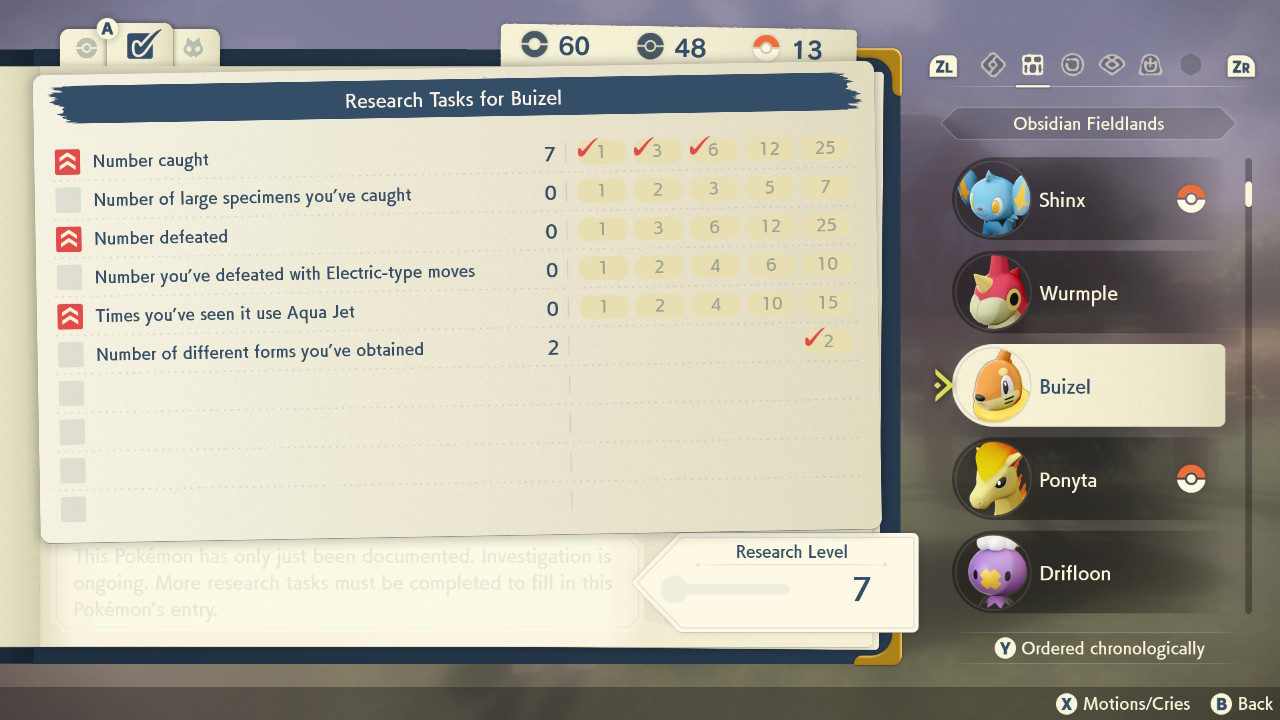
The way research levels and checkmarks add up can be a little confusing at first. Once you’ve completed a research task, you’ll get a checkmark by that task. This checkmark is equal to 1 research level. You may also notice a symbol with 2 red arrows. So what do the two red arrows mean in Pokemon Arceus? If that task has this red arrow icon next to it, every checkmark for that task will be doubled. For example, in the screenshot below we have 3 checkmarks on the first task. These will be doubled because of the red arrows next to it for a sum of 6 levels. The last task has one checkmark but no arrows, adding 1 level to the total, Research Level 7.

red arrows pokedex arceus

Pokemon Legends Arceus 1.0.2 Update Makes Cherrim Easier to Catch & More

Pokemon Legends Arceus came out just a couple weeks ago and the development team is already working on updates for the game to patch glitches, fix bugs, and provide a better gaming experience for players. On February 8th, the second Pokemon Legends Arceus patch came out, v1.0.2. This update fixes several bugs reported by the community. Here are the glitches that were fixed.

https://platform.twitter.com/widgets.js

Ver. 1.0.2 Patch Notes

  • Fixed an issue where, while offline, the screen could freeze after trying to pick up a lost satchel by throwing out a ball that contains a Pokémon.
  • Fixed an issue that sometimes made it difficult to catch Cherrim.
  • Fixed an issue where a certain event would not occur during a particular Mission, preventing the scenario from proceeding as intended.
  • Fixed an issue where players could obtain certain Pokémon twice instead of once only as intended, prohibiting the player from obtaining other certain Pokémon. The relevant Pokémon will appear for players who were unable to catch those certain Pokémon due to this issue.

These Pokemon Legends Arceus patch notes are from the official Nintendo website here.

Cherrim Catch Rate Fix

Some players were reporting that it was near impossible to catch Cherrim when they found it. No matter how many Pokeballs were thrown or how weak it was, it would still break out. This has now been fixed in this update so players should be able to catch Cherrim easier now.

Azelf Bug Patch

A glitch was reported by players that Azelf was spawning after the initial catch. This is not supposed to happen as you’re only supposed to be able to catch this Pokemon once. This caused players to obtain multiple Azelf. This same issue would cause these players to be unable to catch other certain Pokemon. Players that were affected by this bug will now be able to catch those Pokemon, making it once again possible to complete their Pokedex.

Request Guide: 19 Unusual Ponyta – Pokemon Legends: Arceus

Request Information

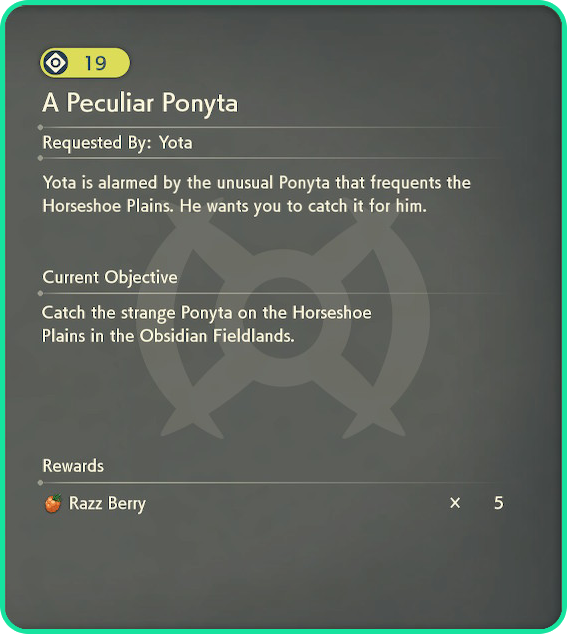
Yota is alarmed by the unusual Ponyta that frequents the Horseshoe Plains. He wants you to catch it for him.

Rewards:

  • Razz Berry x5

Below are spoilers for this specific request. Scroll down only if you want the answers.


Request Guide

Once you catch the Shiny Ponyta and return to Yota, who gives you the side quest, you do not have to give it to them. You’ll only show it to them. This means you’ll be able to keep the Shiny Ponyta after the request is finished.

How to get Shiny Ponyta

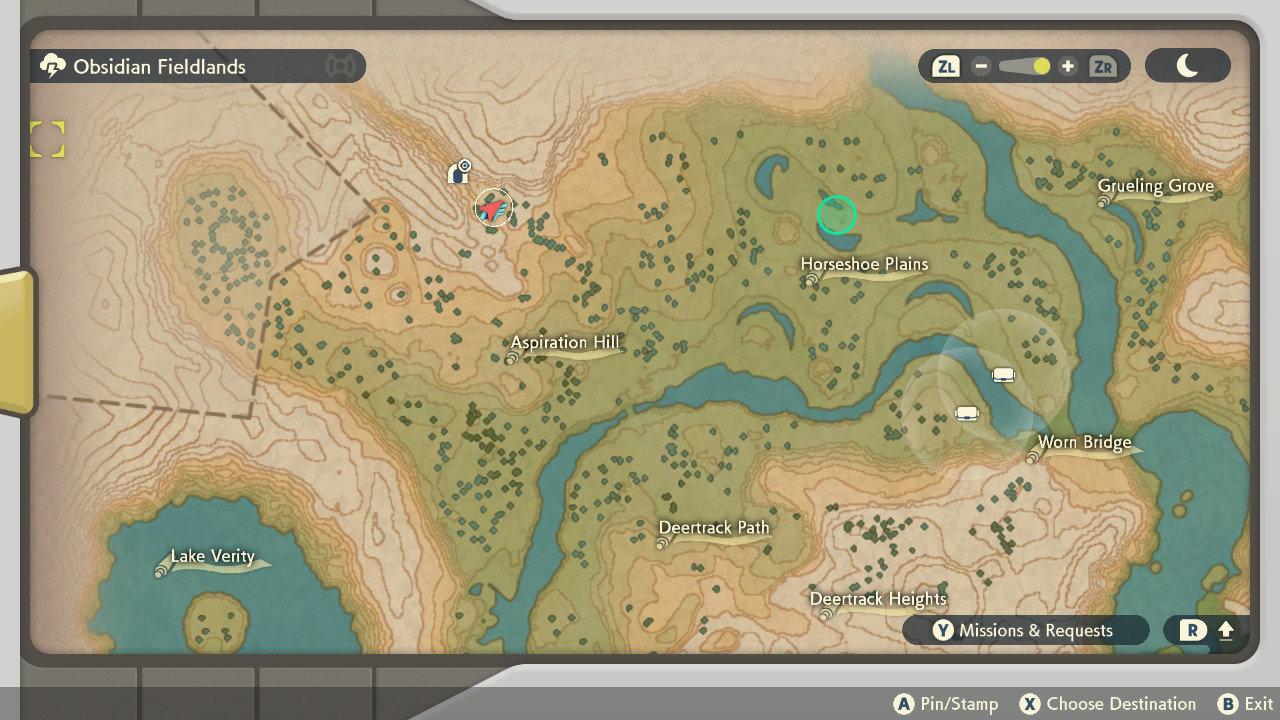
Go the the request marker in the Obsidian Fieldlands. From here, a short cutscene will play and a Shiny Ponyta will spawn. I

Peculiar Ponyta location map

If Shiny Ponyta Runs Away

If you fail to catch the Shiny Ponyta, don’t worry as it will spawn again. If the Shiny Ponyta runs away, to get it to respawn, you’ll need to travel to Jubilife Village and then back to the Obsidian Fieldands. If you want to avoid this issue, you can save the game before you attempt to catch the shiny Ponyta and load the game if it runs away. This strategy of saving and loading the game also works for other shinys you find though out Hisui.

Request Guide: 45 Shellos of the East and West – Pokemon Legends: Arceus

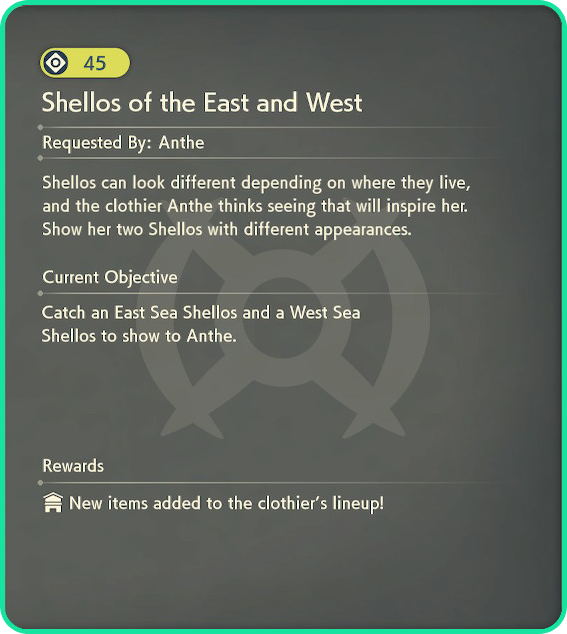
Request 45 Information

Shellos can look different depending on where they live, and the clothier Anthe thinks seeing that will inspire her. Show her two Shellos with different appearances.

Rewards:

  • New items added to the clothier’s lineup!
Shellos of the east and west request info

Below are spoilers for this specific request. Scroll down only if you want the answers.


Request Guide

The East and West Shellos look very different as one is pink and the other is blue. But they’re found on opposite coasts. This means you’ll have to travel to two different areas and do some of the main story to unlock the Cobalt Coastlands.

West Shellos Location

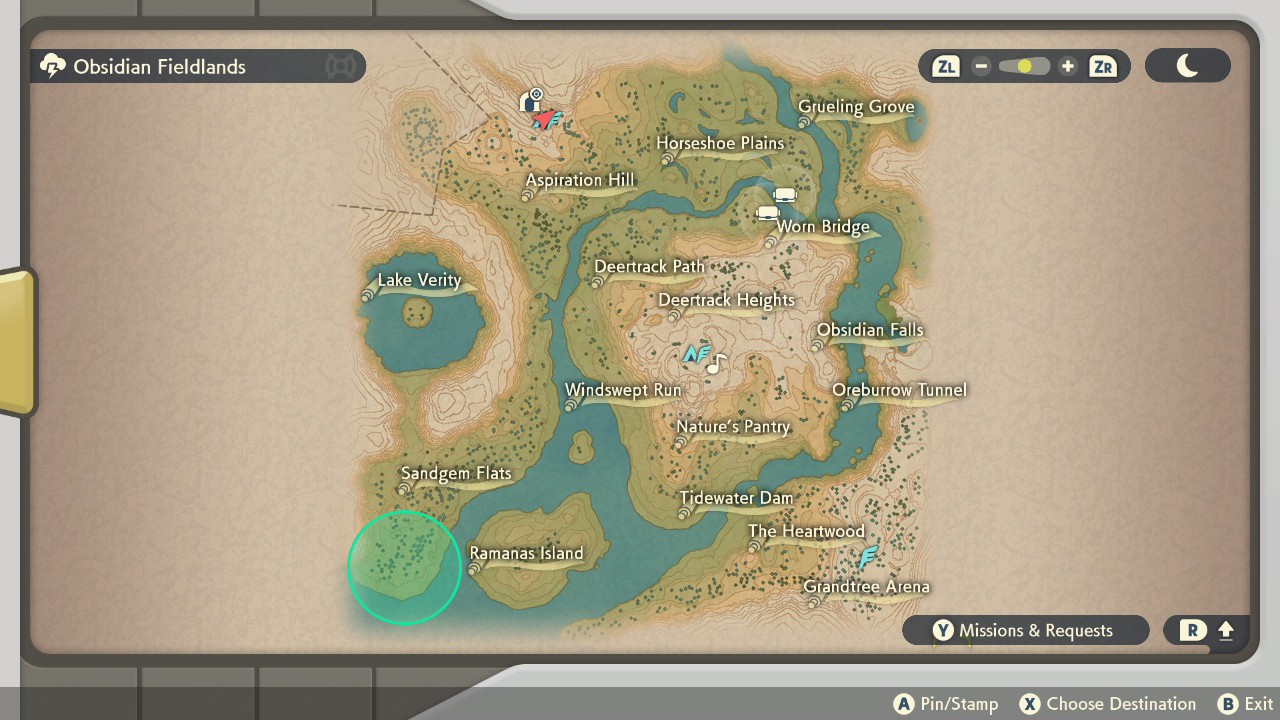
The West Sea Shellos is located in the Obsidian Fieldlands and is the Pink Shellos. These Pokemon can be found South of the Sandgem Flats along the coast.

West Shellos Location

East Shellos Location

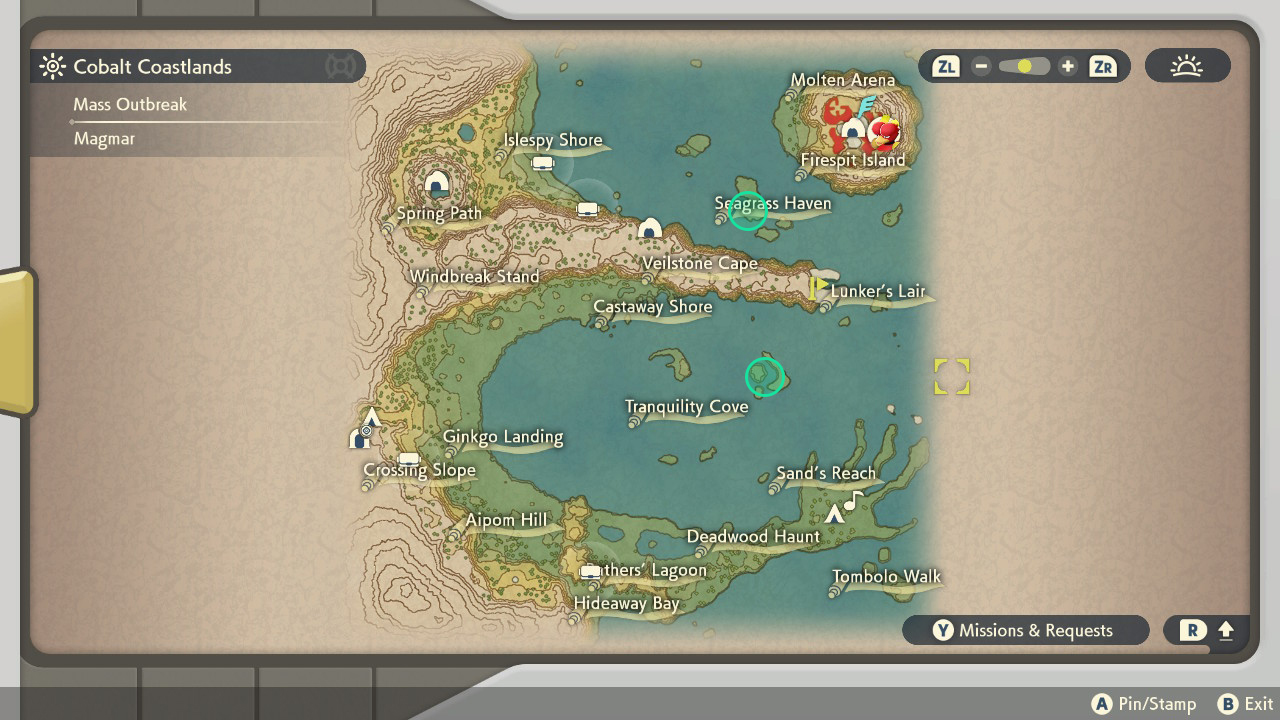
After you’ve unlocked the Cobalt Coastlands area and Basculegion, you’ll be able to find the East Coast Shellos or the Blue Shellos. These Pokemon are located out on islands in the Cobalt Coastlands that are highlighted below on the map.

East Shellos Location

How to Release Multiple Pokemon and Organize Legends Arceus Pastures

In Pokemon Legends Arceus you catch hundreds of Pokemon and most of them you wont need to keep. After catching dozens of Pokemon in the wild, your pastures will quickly fill up. Along with pages filling up you’ll find it quickly becomes disorganized with all of the Pokemon you’re catching around Hisui. To stop this from happening, you’ll need to release Pokemon that you don’t need or want cluttering your pasture. Here’s some tips on organizing your Pokemon Pastures in Pokemon Legends Arceus.

How to Release Multiple Pokemon From Pasture

In the beginning of the game, you’re only able to select and release one Pokemon at a time in your pasture. This can be tedious and slow. To release multiple at once first you’ll need to fill up 4 pasture pages or boxes. Once you’ve filled four boxes, talk to Marie in Jubilife Village and you’ll unlock the feature, allowing you to select and release multiple Pokemon at once.

Organizing Your Pastures

The best way to oragnize and manage the Pokemon in your pasture is to move multiple Pokemon at once. Press Y until you get to Multiselect. Select Pokemon that are alike. You can sort it however you like, by type, evolution stage, color, name, etc. Pressing the + button will let you see all of your Pastures so you don’t have to press the L and R buttons excessively while organizing. Here you can also change names of specific Pastures or boxes. This way, if you want to designate a certain pasture for Shiny Pokemon, or one for your small Buizel collection, you can rename it to that.

Request Guide: 4 Big Buizel, Little Buizel – Pokemon Legends: Arceus

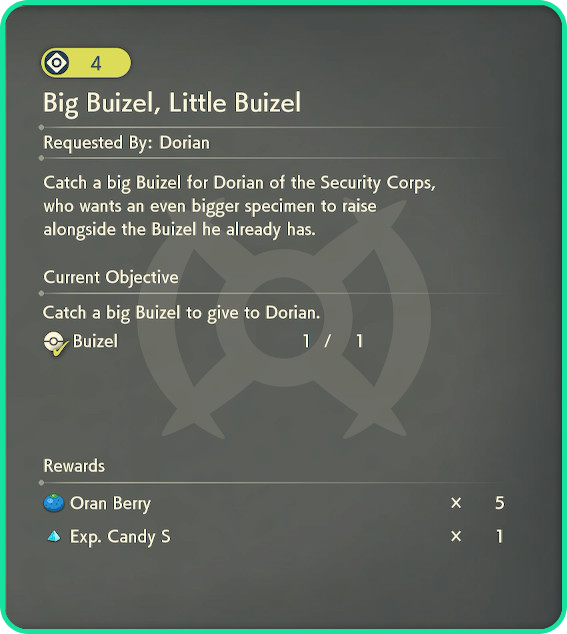
Request Information

Catch a big Buizel for Dorian of the Security Corps, who wants and even bigger specimen to raise alongside the Buizel he already has.

Rewards:

  • Oran Berry x5
  • Exp. Candy S x1

Below are spoilers for this specific request. Scroll down only if you want the answers.


Request Guide

Big Buizel Little Buizel is infamous for being one of the most frustrating side quests to complete in Pokemon Legends Arceus. This is because most Buizels that you’ll catch will be under the required height of 2’8″. To get a large Buizel over this height is mostly luck. To increase your odds, you’ll just need to catch a large quantity but there are still tips for making sure you catch one over 2’8″.

Big Buizel Locations

Our strategy for catching a big Buizel is to go to the Obsidian Fieldlands, South of the Horseshoe Plains. This area highlighted below will have several Buizel to catch but beware of the Alpha Floatzel if you’re low level. Hide in nearby grass or use smoke bombs while catching as many Buizel as you can. If you’ve already beat the first boss, there’s a chance you’ll find an Alpha Buizel spawn as well.

big Buizel spawn location

Alpha Buizel

Another way to ensure you catch a big Buizel over 2’8″ is catching an Alpha. All Alphas are relatively large so if you come across an Alpha Buizel make sure to save your game and catch it. If you fail to catch it, load game and try again. The Buizel you use for this side quest will be lost because you’ll give it to Dorian. So make sure you’re okay with parting ways with your big Buizel.

GameStop is Giving Free Mystery Gifts for Pokemon Legends Arceus

GameStop Arceus Code

Pokemon Legends Arceus just came out in January and GameStop is taking the opportunity to hold their own promotion for the new game. Between February 25th and March 13th, GameStop is running a promotion for a free Mystery Gift in Legends Arceus for players to claim. To get a Gamestop Arceus code, go to your local GameStop between the timeframe and you may receive a code for an in game Mystery Gift.

Free Hisuian Growlithe & 20 Feather Balls

Upon claiming this code, players will receive a free Hisuian Growlithe and 20 Feather Balls. Hisuian Growlithe isn’t usually available until later in the game so this will allow players to add a Hisuian Growlithe to their party early on in the game.

The promotion reads “Available only while supplies last. No purchase necessary.”. This means you won’t have to purchase the game or anything in general to receive a code. As long as they have codes available you should be able to get one. Just go to the counter at your local GameStop and ask for a Pokemon Legends Arceus Growlithe code. This promotion is available in North America. There’s no news on an international promo just yet.


Buy Pokemon Legends Arceus

To claim this code you’ll need the game. If you haven’t already, it’s a great time to get the newest Pokemon game, Legends Arceus! Explore Hisui with your new Hisuian Growlithe and experience all of the new gameplay features introduced in this new title.

How to Check & Increase Friendship in Pokemon Legends Arceus

How to Check Friendship

The first thing you’ll need to do is find Belamy in Jubilife Village. He’ll be standing next to the pastures fence and will offer a request. This side quest, called Friendship Checker, is how you unlock this feature. After you’ve completed request No. 7, you can bring any Pokemon to Belamy and they’ll tell you your compatibility with that specific Pokemon.

How to Increase Friendship

For this side quest and certain Pokemon evolutions, you’ll need to increase your friendship level. There are several way to raise your friendliness with a Pokemon. If you’re friendship farming to evolve a certain Pokemon, follow these methods. Here are the ways we’ve found.

  • Exp Candy

You can get Exp. Candy from certain requests, farming Alpha Pokemon, or by buying them in Jubilife Village, if you’ve unlocked the candy stand. This method might be the easiest way if you have the funds but for many players this can be really expensive and not worth it. It might be better to use your time than money for this task.

  • Gathering Materials

The best way to use your time to increase friendship is gathering materials. This means using that Pokemon to collect berries, minerals, ore, and other crafting materials found across Hisui. Pretty simple and low risk.

  • Battling with the Pokemon in your party

Battling with the Pokemon in your party will increase it’s friendship level but you can also decrease your friendship level with this method so you must be careful. A Pokemon fainting will decrease it’s friendship with it’s trainer. To avoid this, battle in low level areas such as Obsidian Fieldlands or battle with the Pokemon in your party without bringing them out in battle. Bringing the Pokemon out in battle will increase it’s friendliness more but don’t do this if it’s too risky.

Pokemon Legends Arceus Friendship Evolutions

Here’s a list of Pokemon that require a high friendship level to evolve them.

  • Budew
  • Buneary
  • Chansey
  • Chingling
  • Cleffa
  • Espeon
  • Golbat
  • Munchlax
  • Pichu
  • Riolu
  • Sylveon
  • Togepi
  • Umbreon